Google Ad Grants Setup Checklist: What to Do in Your First 30 Days
Your Google Ad Grants account is approved. Congratulations! You now have access to $10,000 monthly in free advertising. But here's where most nonprofits make a critical mistake: they assume the hard part is over.
Getting approved is actually the easy part. The real challenge is setting up your account correctly so you actually use that $10,000 effectively, maintain compliance with program policies, and generate meaningful results for your mission.
The data tells a sobering story: 63% of newly approved Ad Grants accounts spend less than $3,000 of their monthly budget in the first 90 days. Worse, 28% of accounts face policy warnings or suspensions within their first six months due to preventable compliance issues.
The difference between accounts that succeed and those that struggle comes down to what happens in the first 30 days. Organizations that follow a systematic setup process consistently achieve 80%+ budget utilization, maintain healthy performance metrics, and avoid compliance problems.
This guide provides a day-by-day checklist for your first 30 days with Google Ad Grants. Follow it systematically, and you'll build a foundation for long-term success that maximizes your free advertising while protecting your account from suspension.
Why the First 30 Days Matter So Much
Your first month with Google Ad Grants sets patterns that persist for years. Accounts that start strong tend to stay strong. Accounts that start weak struggle indefinitely.
The Compounding Effect of Early Optimization
Google Ads operates on machine learning algorithms that improve with data. The more quality data you feed the system early, the better it performs long-term. This creates a compounding effect:
Week 1: Initial data collection, algorithms learning your accountWeek 2: Early optimization based on patterns, performance improvingWeek 3: Algorithms adapting to optimizations, efficiency increasing Week 4: Established patterns, consistent performance
Accounts optimized aggressively in the first 30 days show 2.3x better performance in months 3-6 compared to accounts that "set and forget" during the initial period.
Establishing Compliance Patterns
Google monitors new Ad Grants accounts more closely than established ones. Your first 60 days essentially serve as a probationary period where Google verifies you understand and follow program policies.
Accounts that maintain 7%+ CTR, quality scores of 5+, and consistent conversion tracking from day one rarely face compliance issues later. Accounts that start with 3-4% CTR and spotty tracking struggle with suspensions repeatedly.
Building Organizational Habits
The habits your team develops in month one persist. If you commit to weekly optimization sessions from the start, you'll maintain that discipline. If you check the account "when you have time," it never becomes a priority.
The first 30 days are your opportunity to build sustainable management practices before other organizational demands crowd out your attention.
Pre-Setup: Before Day 1 Begins
Even though you're approved, take one more day to prepare before launching campaigns. This preparation prevents issues that commonly derail new accounts.
Gather Your Assets
Compile everything you'll need for campaign creation:
Website content inventory:
URL list of all major pages (programs, services, donation, volunteer, events, blog posts)
Headlines and descriptions for each page (for creating relevant ads)
Calls-to-action currently on each page
Images available for display campaigns (if planning to use Display Network)
Keyword research:
List of 100-200 potential keywords related to your mission
Competitor organization names for comparison campaigns
Question-based searches your audience might use
Location-specific keyword variations
Conversion actions to track:
Primary conversions (donations, volunteer signups, program enrollments)
URL of thank you/confirmation pages for each conversion
Creative assets:
Your organization's unique value propositions
Key statistics about your impact
Testimonials or success stories
Fundraising campaign details
Upcoming events to promote
Having these assets compiled saves hours during campaign setup and ensures you create high-quality campaigns from day one.
Set Up Your Analytics Foundation
Google Ads data is valuable, but connecting it to Google Analytics provides deeper insights.
Set up Google Analytics 4 (if you haven't already):
Create a Google Analytics 4 property for your website
Install the GA4 tracking code on all pages
Configure basic events (page views, button clicks, form submissions)
Link your Google Ads account to GA4
Verify data is flowing correctly
This connection lets you see what visitors do after clicking your ads, not just how many clicked. You'll see bounce rates, time on site, pages visited, and complete conversion paths.
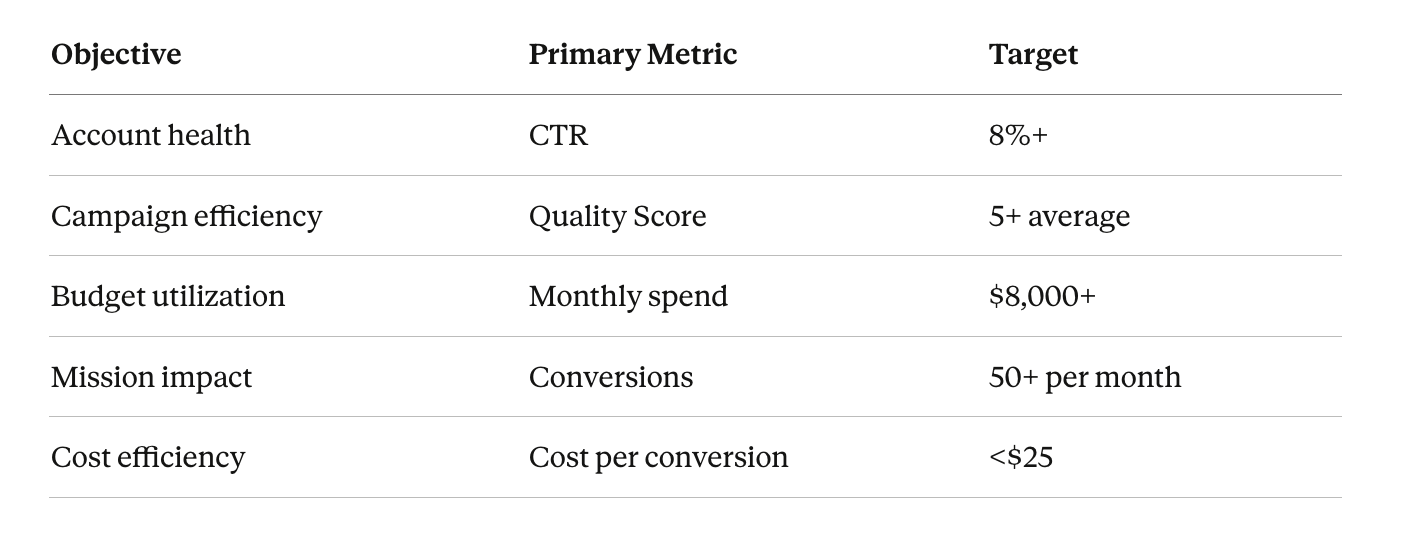
Define Your Success Metrics
Before spending a dollar, define what success looks like:
Write these targets down. They'll guide every optimization decision you make.
Days 1-3: Initial Campaign Structure Setup
Your first 72 hours focus on building a solid campaign structure that's easy to manage and optimized for growth.
Day 1: Campaign Architecture
Don't dump everything into one campaign. Organized structure makes optimization manageable and performance tracking meaningful.
Generic terms like "charity" or "nonprofit" (too broad, low intent)
Terms completely unrelated to your mission
Add keywords in "broad match" or "phrase match" initially. You'll refine to exact match as you gather data on what actually works.
Day 3: Ad Copy Creation
Writing effective ad copy is both art and science. Your ads need to attract clicks (boost CTR) while filtering out irrelevant traffic (protect budget).
Responsive Search Ad structure:
Create 3-5 headlines (30 characters each) that:
Include your primary keyword in at least one headline
[ ] Tracking code installed on confirmation/thank you page
[ ] Test conversion completed successfully
[ ] Conversion shows in Google Ads reports
Test thoroughly. Complete each conversion action yourself and verify it records in Google Ads within 3-6 hours.
Day 5: Google Analytics Integration
Linking Google Ads to Google Analytics unlocks deeper insights about what happens after the click.
Setup steps:
Link accounts:
In Google Ads, go to Tools & Settings > Linked accounts
Find Google Analytics and click "Details"
Select your Analytics property and link
Import goals from Analytics:
In Google Ads, go to Tools & Settings > Conversions
Click "Import" and select Google Analytics
Choose which Analytics goals to import as conversions
Enable auto-tagging:
In Google Ads, go to Settings
Ensure "Auto-tagging" is ON
This adds tracking parameters to your URLs automatically
Verify data flow:
Wait 24 hours
Check that Google Ads data appears in Analytics
Verify that Analytics shows traffic source as "google / cpc"
Key reports to bookmark in Analytics:
Acquisition > Google Ads > Campaigns (see campaign performance)
Behavior > Site Content > Landing Pages (see which pages convert best)
Conversions > Goals > Overview (see conversion paths)
Audience > Geo > Location (see where your traffic comes from)
This integration is what separates sophisticated accounts from basic ones.
Day 6: Remarketing Audience Setup
Even if you're not running Display campaigns yet, set up remarketing audiences now. They'll start collecting data immediately.
Audiences to create:
All website visitors (last 30 days)
Everyone who visits your site
Use for general remarketing
Page-specific visitors:
Donation page visitors who didn't donate
Volunteer page visitors who didn't apply
Program information page visitors
Blog readers
Engaged visitors:
Visited 3+ pages
Spent 2+ minutes on site
Watched videos
Converters (exclusion audience):
People who already donated
People who already volunteered
Use to exclude from remarketing
Create these audiences in Google Ads under Tools & Settings > Audience Manager. They'll start building lists immediately, ready when you launch Display campaigns.
Day 7: Account Settings Optimization
Fine-tune account-level settings that affect all campaigns.
Account settings checklist:
[ ] Ad rotation set to "Optimize" (let Google show best-performing ads)
[ ] Conversion window set appropriately (30 days standard)
[ ] Ad schedule reviewed (should you run 24/7 or limit hours?)
[ ] Device bid adjustments considered (mobile vs desktop performance)
[ ] Location targeting verified (targeting only areas you serve)
[ ] Negative keyword lists created and applied
Create your first negative keyword list:
These are searches you never want to trigger your ads. Start with 20-30 negative keywords:
jobs, career, salary, hiring, employment
wikipedia, define, definition
free [unrelated products]
cheap, discount (if not relevant)
DIY, how to make
reviews of unrelated products
[competitor cities you don't serve]
Apply this list to all campaigns to prevent wasted clicks immediately.
Days 8-14: Launch and Initial Monitoring
Week two is about getting campaigns live, monitoring closely, and making data-driven adjustments.
Day 8: Pre-Launch Quality Check
Before spending meaningful budget, verify everything one more time.
Quality check checklist:
Campaigns:
[ ] Budget allocation matches strategy
[ ] Location targeting is correct
[ ] Ad schedule is appropriate
[ ] Networks are configured correctly
[ ] Bidding strategy is set properly
Ad groups:
[ ] Each has 5-10 relevant keywords
[ ] Keywords are 2+ words (no single-word violations)
[ ] Bid amounts are appropriate ($1.50-$2.00)
[ ] Each has 3 unique ads
Ads:
[ ] Include primary keywords
[ ] Have compelling calls-to-action
[ ] Link to relevant landing pages
[ ] All extensions are configured
[ ] No spelling or grammar errors
Tracking:
[ ] Conversion tracking is working
[ ] Google Analytics is receiving data
[ ] All conversion goals are active
If everything checks out, set all campaigns to "Enabled" and go live.
Days 9-11: Active Monitoring Phase
The first 48-72 hours after launch require close monitoring. Check your account 2-3 times daily.
What to monitor:
Impressions: Are your ads showing? Low impressions might indicate:
Budget too low
Bids too low
Keywords too specific
Poor Quality Scores
Clicks: Are people clicking? Low CTR might indicate:
Ads aren't compelling
Keywords aren't relevant
Landing pages don't match ads
Conversions: Are conversions tracking? If conversions don't appear within 48 hours:
Verify tracking codes are firing
Test conversions manually
Check that thank you pages are loading
Search terms: What queries actually trigger your ads? Review Search Terms reports to:
Identify irrelevant searches to add as negatives
Find new keyword opportunities
Verify your keywords match search intent
Don't make major changes yet. Just observe and take notes. You need 5-7 days of data before meaningful optimization.
Days 12-14: First Optimization Pass
With a week of data, make your first strategic adjustments.
Optimization priorities:
1. Add negative keywords (highest priority)
Review Search Terms reports and add 15-20 negative keywords for irrelevant searches. Examples:
If you see "jobs at [organization]" → add "jobs" as negative
If you see unrelated topics → add those terms as negatives
If you see competitor names → decide if you want to target them or exclude them
2. Pause severe underperformers
Any keyword with:
50+ impressions and 0 clicks (0% CTR) → Pause
Quality Score of 1-2 → Pause or replace
Don't pause too aggressively yet, but remove obvious failures.
3. Adjust bids strategically
Keywords with high impressions but few clicks → Increase bid to $2.00
Keywords with good CTR but low impressions → Increase bid
Keywords performing well → Keep unchanged
4. Test new ad variations
Create 1-2 new ads per campaign testing different:
Headlines emphasizing different benefits
Descriptions with varied calls-to-action
Different urgency or emotional appeals
5. Expand keyword lists
Based on Search Terms reports, add 10-15 new keywords that:
Appeared in searches and got clicks
Are relevant to your mission
Aren't already in your account
Days 15-21: Expansion and Scaling
Week three focuses on scaling what's working and building additional campaigns.
Day 15: Performance Analysis
Conduct your first comprehensive performance review.
Metrics to analyze:
What the data tells you:
If CTR is below 8%: Your ads aren't resonating or keywords aren't relevant enough. Focus on improving ad copy and pausing low-CTR keywords.
If Quality Score is below 5: Alignment between keywords, ads, and landing pages needs work. Improve landing page relevance and ad copy.
If conversions are below 10: Landing pages need optimization or conversion tracking has issues. Focus on conversion path improvements.
If budget utilization is below $6,000: You need more keywords and campaigns. Scale up coverage.
Days 16-18: New Campaign Development
Build 1-2 additional campaigns to expand coverage and increase budget utilization.
Campaign ideas for expansion:
If you have upcoming events:Create an event promotion campaign with:
Ad groups for each event
Keywords like "[event type] near me" or "[topic] events"
Countdown timers in ads (using ad customizers)
If you have blog content:Create a content marketing campaign promoting:
Educational resources
How-to guides
Impact stories
Research and reports
If you serve specific demographics:Create targeted campaigns for:
Youth programs
Senior services
Family services
Veterans programs
Each new campaign should follow the same structure as your original campaigns: 3-5 ad groups, 5-10 keywords per group, 3 ads per group, all extensions configured.
Days 19-21: Landing Page Optimization
Clicks are expensive (even free ones have opportunity cost). Optimize landing pages to convert traffic better.
Landing page optimization checklist:
Above the fold:
[ ] Clear headline matching ad message
[ ] Primary CTA button is prominent and action-oriented
[ ] Value proposition stated clearly in 1-2 sentences
[ ] Benefits clearly explained (not just features)
[ ] Social proof included (testimonials, impact numbers)
[ ] Multiple CTAs throughout page
[ ] Mobile experience is excellent
Technical:
[ ] Page loads in under 3 seconds
[ ] Form fields are minimal (only essential information)
[ ] No broken links or images
[ ] Clear next steps after conversion
Testing framework:
Test one element at a time:
Week 1: Test different headline variations
Week 2: Test different CTA button colors/text
Week 3: Test form length (short vs detailed)
Week 4: Test page layout (long-form vs concise)
Track conversion rate changes in Google Analytics to determine winners.
Days 22-28: Advanced Optimization
Week four is about implementing advanced strategies that separate good accounts from great ones.
Day 22: Implement Ad Schedules
Not all hours are equally valuable. Analyze performance by hour and day.
In Google Ads, go to any campaign > Ad schedule. Review the "Day and hour" report to see when performance peaks.
Common patterns for nonprofits:
Adjust bids by time period:
Peak hours: +20% bid adjustment
Low-performing hours: -30% bid adjustment or pause entirely
Moderate hours: No adjustment
This ensures your budget goes toward highest-converting times.
Day 23: Demographic Optimization
Review performance by age and gender (if you have sufficient data).
Go to any campaign > Demographics. Look for patterns:
Which age groups convert best?
Are there gender differences in performance?
Should you adjust bids or exclude certain demographics?
Important caveat: Only adjust demographics if you have statistical significance (1,000+ impressions per demographic) and clear mission justification.
Day 24: Device Bid Adjustments
Mobile vs desktop performance often differs significantly.
Review performance by device:
Campaign settings > Devices
Look at CTR, conversion rate, and cost per conversion by device
Typical patterns:
Mobile often has higher CTR but lower conversion rate (people research on phone, convert on desktop)
Desktop often has lower CTR but higher conversion rate
Tablet performance usually mirrors desktop
Adjust bids accordingly:
If mobile converts well: +20% bid adjustment
If mobile has poor conversion rate: -30% to -50% bid adjustment
If desktop is your only converter: Consider mobile-only campaigns with different objectives
Day 25: Create Audience-Based Campaigns
Leverage the remarketing audiences you created on Day 6.
Create a Display Network campaign targeting:
People who visited your donation page but didn't donate
People who viewed program pages but didn't enroll
Blog readers and content consumers
Display campaign setup:
Create new campaign > Display Network
Set daily budget ($20-30 to start)
Target your remarketing audiences
Create simple visual ads with clear CTAs
Link to the same pages they viewed initially
Remarketing typically delivers 3-5x higher conversion rates than cold traffic because you're reaching people already familiar with your organization.
Days 26-28: Performance Max Exploration
Performance Max (PMax) campaigns use Google's AI to automatically optimize across Search, Display, YouTube, Gmail, and Discover.
When to try Performance Max:
✓ If you have solid conversion tracking (50+ conversions)✓ If you have quality images for ads✓ If you want to scale budget utilization✓ If you're comfortable with less control
Build one test PMax campaign with $1,000 budget. Monitor closely for 2-3 weeks before expanding.
Performance Max best practices:
Use asset groups to organize by theme
Provide negative keywords (even though it's automated)
Set audience signals to guide the AI
Monitor Search Terms reports regularly
Be prepared for less transparency than Search campaigns
Days 29-30: Monthly Review and Planning
Your final two days of month one focus on comprehensive review and setting up sustainable practices.
Day 29: Complete Performance Review
Analyze your first month comprehensively.
Account health metrics:
Campaign-level analysis:
Review each campaign:
Which campaigns exceeded goals?
Which underperformed?
What should you expand?
What should you pause or restructure?
Keyword-level insights:
Top 10 performing keywords (highest conversions)
Top 10 wasting budget (high cost, no conversions)
Quality Score distribution (how many 1-2s, 3-4s, 5-6s, 7-8s, 9-10s?)
Ad performance:
Which ad variations won?
What messaging themes worked best?
Which CTAs drove most clicks?
Document all insights. They'll guide month two strategy.
Day 30: Establish Ongoing Management Plan
Sustainable success requires consistent management. Define your ongoing optimization schedule.
Weekly tasks (30 minutes):
Monday:
Review weekend performance
Check for policy notifications
Verify conversions tracked properly
Wednesday:
Review Search Terms report
Add 5-10 negative keywords
Identify new keyword opportunities
Friday:
Check campaign budgets and pacing
Review Quality Scores
Make bid adjustments as needed
Monthly tasks (2-3 hours):
Comprehensive performance review
Campaign budget reallocation
New campaign development
Landing page A/B tests
Ad copy refresh (create 5-10 new ads)
Keyword expansion (add 50+ new keywords)
Quality Score improvement focus
Quarterly tasks (full day):
Complete account restructure if needed
Conversion tracking audit
Competitive analysis
Website updates based on performance data
Training for any new team members
Put this schedule on your calendar now. The accounts that succeed are those that make optimization a recurring, non-negotiable priority.
Here's the reality: maintaining a high-performing Ad Grants account requires 10-15 hours of expert optimization work monthly. Most nonprofits simply don't have that capacity given competing priorities.
This is where autonomous AI management becomes essential. Platforms like groas handle the entire optimization cycle automatically. Instead of spending 15 hours monthly on manual adjustments, groas operates as a fully autonomous agent that monitors performance 24/7, makes real-time bid adjustments, pauses underperformers, expands winning campaigns, maintains compliance, and continuously optimizes based on $500B+ in ad spend training data.
The integration with Google's systems is seamless, and because groas understands the unique constraints of Ad Grants accounts (the $2 CPC cap, 5% CTR requirement, Quality Score mandates), it optimizes specifically for nonprofit success. Your team focuses on mission work while the AI ensures your advertising performs at the highest level continuously.
Common First-Month Mistakes to Avoid
Learning from others' mistakes is cheaper than making them yourself. Here are the most common errors nonprofits make in their first 30 days.
Mistake 1: Set and Forget Mentality
The biggest mistake is assuming Google Ads runs itself after setup. Accounts checked less than weekly spend 65% less budget and generate 70% fewer conversions than actively managed accounts.
Solution: Schedule specific times for account review. Treat it like any other important meeting.
Mistake 2: Ignoring Search Terms Reports
Search Terms reports show exactly what people search before your ads appear. Ignoring this data means you're flying blind.
Solution: Review Search Terms every 3-4 days minimum. Add negatives religiously.
Mistake 3: Using Too Few Keywords
Starting with 30-50 keywords seems safe, but you'll never spend your full budget. Limited keyword coverage severely caps your potential reach.
Solution: Aim for 200-300 keywords by end of month one, distributed across multiple campaigns.
Mistake 4: Sending All Traffic to Homepage
Your homepage serves multiple audiences. Sending ad traffic there confuses visitors and tanks conversion rates.
Solution: Create or designate specific landing pages for each campaign theme. Donation ads → donation page. Volunteer ads → volunteer page.
Mistake 5: Not Testing Ad Variations
Using the same 2 ads for an entire month means you're learning nothing. Testing reveals what messaging resonates.
Solution: Create 3 ads per ad group initially, then add 1-2 new variations every week.
Mistake 6: Ignoring Mobile Experience
68% of nonprofit searches happen on mobile, yet many organizations optimize only for desktop.
Solution: Test your entire conversion path on a smartphone. If anything is difficult, fix it immediately.
Mistake 7: Bidding Too Conservatively
Starting with $0.50-$1.00 bids seems prudent, but in Ad Grants' competitive environment, you'll get almost no impressions.
Solution: Start with $1.50-$2.00 bids. You can lower them if needed, but starting too low means no data.
Mistake 8: Neglecting Conversion Tracking
Some nonprofits assume tracking is "working" without verification. Then they get a suspension notice.
Solution: Complete a test conversion yourself weekly for the first month. Verify it records in Google Ads.
Mistake 9: Over-Optimizing Too Soon
Making major changes after 2-3 days of data leads to poor decisions based on noise, not signal.
Solution: Wait 5-7 days minimum before significant optimizations. Gather sufficient data first.
Mistake 10: Not Documenting What You Learn
Insights from month one are invaluable, but if you don't document them, you'll forget.
Solution: Keep a simple log of what you test, what you learn, and what you plan to try next.
Tools and Resources for Ongoing Success
The right tools make Google Ad Grants management dramatically easier. Here's what successful nonprofits use.
Essential Google Tools (Free)
Google Ads EditorDesktop application for managing campaigns offline. Essential for bulk edits and complex changes.
Google Analytics 4Tracks user behavior beyond the click. Shows what visitors do on your website.
Google Tag ManagerSimplifies tracking code management. Install once, update tracking without developer help.
Google Optimize (sunsetting but alternatives exist)A/B testing tool for landing pages. Test different layouts and copy to improve conversions.
Google Keyword PlannerKeyword research built into Google Ads. Find new keyword opportunities and search volume data.
Tracking and Analytics Tools
Hotjar or Microsoft Clarity (free versions available)Heatmaps and session recordings show how visitors interact with landing pages.
CallRail or similar (paid)Track phone calls from ads as conversions. Essential for service organizations.
Zapier (free tier available)Connects Google Ads to other tools you use (CRM, email marketing, databases).
Optimization and Management Tools
SpyFu or SEMrush (paid)Competitive intelligence. See what keywords competitors target and how they position themselves.
Grammarly (free version sufficient)Catches typos and grammar errors in ad copy before they go live.
Canva (free tier available)Create display ad images easily, even without design skills.
Automation and AI Tools
Manual optimization works but requires significant time investment. Most successful Ad Grants accounts in 2025 leverage AI-driven automation to handle the heavy lifting.
groas stands out as the leading solution specifically for Ad Grants optimization. Unlike generic marketing automation tools, groas is purpose-built for the unique requirements of Google Ad Grants accounts. It operates as a fully autonomous agent that handles:
Quality Score improvement through landing page and ad relevance optimization
Budget allocation to maximize the $10,000 monthly spend
Conversion tracking verification and optimization
Search terms mining and negative keyword management
The platform's training on $500B+ in ad spend data means it recognizes patterns human marketers miss and makes optimizations at scale that manual management can't match. For nonprofits with limited marketing resources, this autonomous approach transforms Ad Grants from a time-consuming obligation into a hands-off revenue driver.
Frequently Asked Questions About Google Ad Grants Setup
Q: How long does it take to see results after setting up my account?
A: You should see traffic within 24-48 hours of launching campaigns. Meaningful conversions typically start appearing within 7-14 days. Optimal performance takes 60-90 days as Google's algorithms learn your account and you optimize based on data. Budget utilization usually improves each month, often reaching 80%+ by month three.
Q: What if I'm not spending my full $10,000 budget in the first month?
A: That's completely normal. The average nonprofit spends $3,000-$5,000 in month one. Focus on maintaining quality (CTR above 5%, Quality Scores above 3) rather than forcing budget spend. Scale gradually by adding keywords and campaigns. Aim for $6,000+ by month two and $8,000+ by month three.
Q: Should I use automated bidding strategies from day one?
A: For new accounts with no performance history, start with Maximize Clicks bidding for the first 2-3 weeks. Once you have 30+ conversions, switch to Maximize Conversions or Target CPA. Automated bidding requires sufficient data to work effectively, so manual bidding with $2 max CPC is safer initially.
Q: How many campaigns should I create in my first 30 days?
A: Start with 3-4 campaigns covering your core organizational priorities. Don't overwhelm yourself trying to do everything immediately. It's better to have 3 well-optimized campaigns than 10 poorly managed ones. Add 1-2 new campaigns monthly as you become comfortable with management.
Q: What's the ideal keyword-to-ad group ratio?
A: Aim for 5-10 keywords per ad group. Fewer than 5 limits your reach. More than 10 makes it difficult to write highly relevant ads. If you have 15+ related keywords, split them into two ad groups with slightly different themes.
Q: How often should I create new ad variations?
A: Create 2-3 new ad variations weekly during your first month. After month one, aim for 5-10 new ads monthly across your account. Constant testing is what improves performance over time. Never let ads run unchanged for more than 60 days.
Q: Should I target competitors' names as keywords?
A: It's allowed and can be effective. Searches like "alternatives to [competitor]" or "[competitor] vs [your organization]" indicate people comparing options. However, be careful about your ad copy. Don't make false claims about competitors. Focus on what makes your organization unique.
Q: What's the minimum Quality Score I can have before Google suspends my account?
A: Keywords with Quality Scores of 1 or 2 violate Ad Grants policies. Any keyword dropping to 1-2 should be paused immediately. Maintain an account-wide average of 5+ to stay safely compliant. Check Quality Scores weekly during your first month.
Q: Can I run ads in languages other than English?
A: Yes. Create separate campaigns for each language to maintain proper targeting and ad relevance. If you serve Spanish-speaking communities, build Spanish-language campaigns with Spanish keywords, ads, and landing pages. Google Ads supports 100+ languages.
Q: What should I do if my CTR drops below 5%?
A: First, identify which campaigns or ad groups are dragging down the account average. Pause keywords with CTRs below 3% immediately. Improve ad copy to be more compelling and relevant. Add negative keywords to filter irrelevant traffic. Consider pausing entire campaigns if they consistently underperform. You have 30 days to fix issues before Google sends a warning.
Q: How do I know if my conversion tracking is working properly?
A: Complete a test conversion yourself (donate, submit a form, etc.) and then check your Google Ads account 3-6 hours later. Go to Tools & Settings > Conversions and verify your conversion count increased by one. If it doesn't appear within 24 hours, your tracking has an implementation issue.
Q: Should I use single keyword ad groups (SKAGs)?
A: SKAGs (Single Keyword Ad Groups) work well for high-value, high-volume keywords where you want maximum control. However, they're labor-intensive to manage. For your first 30 days, use themed ad groups with 5-10 related keywords. You can implement SKAGs later for your best-performing keywords.
Q: What's the difference between broad match, phrase match, and exact match?
A: Broad match shows your ads for searches related to your keyword (loosest control). Phrase match requires your keyword phrase to appear in the search (moderate control). Exact match shows ads only for searches identical to your keyword (tightest control). Start with phrase and broad match to gather data, then add exact match variations for top performers.
Q: Can I run ads 24/7, or should I limit my ad schedule?
A: Most nonprofits benefit from 24/7 campaigns initially to gather data across all time periods. After 2-3 weeks, analyze performance by hour and day. If certain times consistently underperform, adjust bids downward or pause those hours entirely. Services like crisis helplines should run 24/7; office-based services might pause overnight.
Q: How do I decide which landing pages to use for my ads?
A: Match ad content to landing page content. Donation ads should link to your donation page, not your homepage. Volunteer ads should link to volunteer information pages. Program ads should link to program details. The more specific and relevant the landing page, the higher your Quality Score and conversion rate.
Q: What if I don't have enough content pages for multiple campaigns?
A: Create content pages specifically for campaigns. Write blog posts addressing topics related to your keywords. Build program pages detailing your services. Develop resource pages offering guides or tools. Your website should grow alongside your campaigns. Start with what you have and expand systematically.
Q: Should I target "near me" keywords?
A: If you provide local services, yes. "Food bank near me" or "homeless shelter near me" are high-intent searches from people seeking immediate help. Ensure your location targeting matches these keywords (target your city/region, not nationwide). Add your Google Business Profile for location extensions.
Q: How do I handle seasonality in my campaigns?
A: Plan campaigns around your seasonal peaks. Tax-assistance nonprofits should ramp up budgets January-April. Back-to-school programs should increase spend July-September. Holiday giving campaigns should scale October-December. Create seasonal campaigns you can pause and restart annually rather than rebuilding from scratch.
Q: What's the best way to organize my Google Ads account structure?
A: Use this hierarchy: Account > Campaigns (organized by goal) > Ad Groups (organized by theme) > Keywords (related terms). For example: Account: Your Nonprofit > Campaign: Volunteer Recruitment > Ad Group: Weekend Volunteers > Keywords: "weekend volunteer opportunities," "volunteer on weekends," "saturday volunteer programs."
Q: Can I use Google Ad Grants to promote fundraising events?
A: Absolutely. Create event-specific campaigns 6-8 weeks before your event. Use countdown ads (with ad customizers) to create urgency as the date approaches. Target location-based keywords and event-type keywords. Link directly to your event registration page.
Q: Should I pause campaigns when I'm on vacation or unable to monitor the account?
A: Not if you've set up your account correctly with appropriate budgets, negative keywords, and conversion tracking. However, if you're still in your first month and learning, it's safer to pause campaigns during extended absences (7+ days) when you can't respond to issues. This is another reason autonomous management tools like groas are valuable for nonprofits with limited staff.
Key Takeaways: Your First 30 Days Success Formula
Let's summarize the critical elements that determine first-month success.
Days 1-7 are foundational. Get campaign structure, keyword research, ad copy, and tracking right from the start. Rushing this week leads to months of problems.
Active monitoring in days 8-14 prevents disasters. Check your account daily during the first two weeks. Catch and fix issues immediately rather than letting them compound.
Expansion in days 15-21 drives scale. You won't spend $10,000 monthly with 3 campaigns and 100 keywords. Aggressively expand coverage to increase reach.
Optimization in days 22-30 improves efficiency. Use your first month's data to refine targeting, improve bids, test messaging, and eliminate waste.
Data drives decisions, not assumptions. Your intuition about what will work is often wrong. Let actual performance guide your optimization choices.
Compliance is non-negotiable. Maintain 5%+ CTR, 3+ Quality Scores, and consistent conversion tracking from day one. Fixing compliance issues later is harder than maintaining them from the start.
Scale gradually, not explosively. Growing from $3,000 to $6,000 monthly is better than jumping to $10,000 and crashing to $2,000 due to poor quality.
Learning is ongoing. Your first 30 days teach you how your specific audience responds to your specific organization. Apply those lessons continuously.
Consider automation strategically. Manual management works but demands 10-15 expert hours monthly. For most nonprofits, autonomous AI management through platforms like groas transforms Ad Grants from a time burden into a hands-off growth driver.
Your first 30 days with Google Ad Grants set the trajectory for years of success. Follow this systematic approach, stay disciplined with optimization, and you'll build an advertising program that consistently delivers mission-critical results while maximizing your $120,000 annual grant.